
Calls stay on your PBX and your carrier. TeamMate runs the session border controllers and call processing in Microsoft Azure, and sets up the Microsoft side for you through Microsoft Graph API and PowerShell.
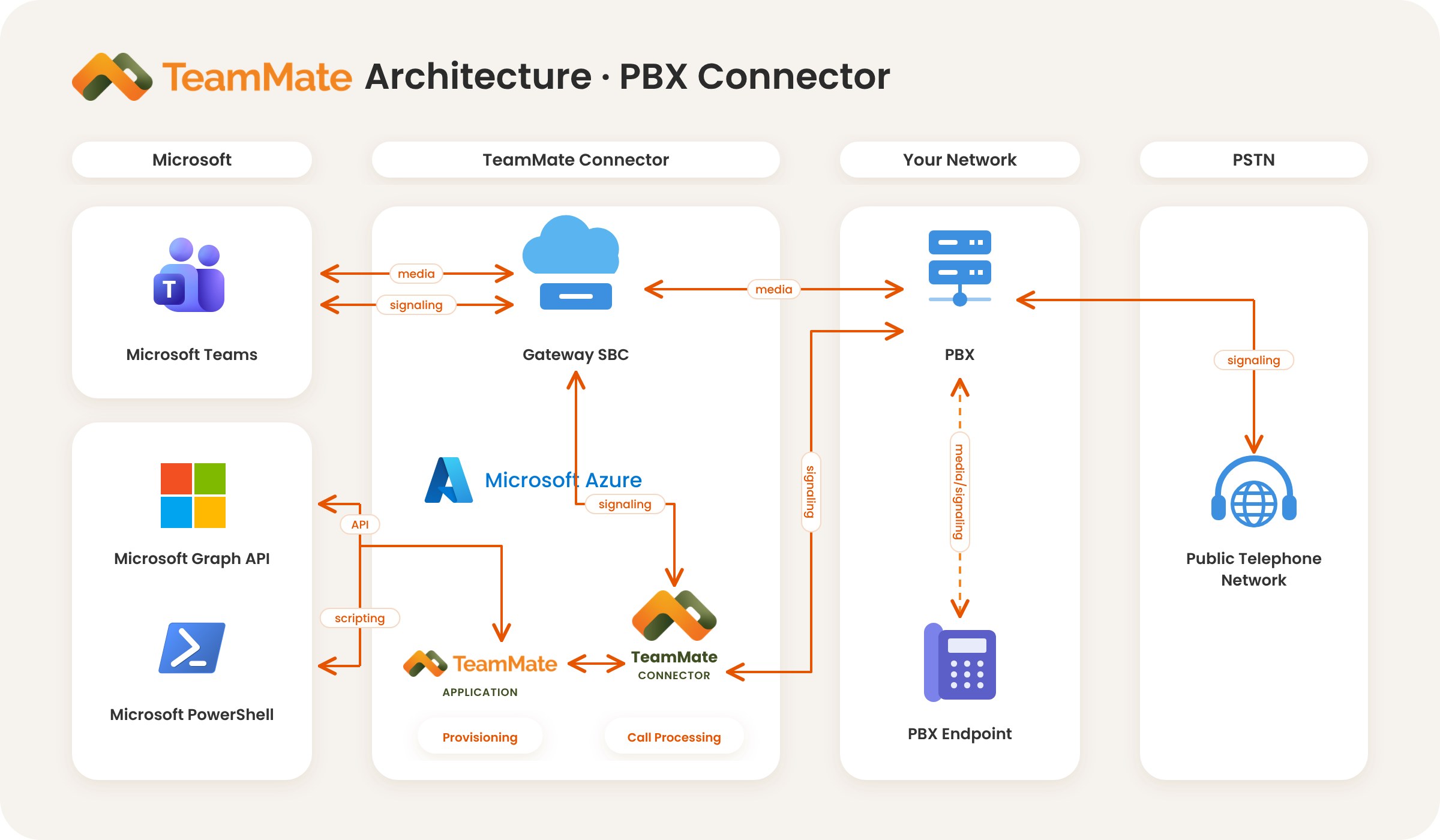
TeamMate sits between Microsoft Teams and the voice platform you already run, without changing either one.
Users make and take calls in the native Teams client. TeamMate sets up each customer's Microsoft 365 tenant through the Microsoft Graph API and automated PowerShell scripts.
The Gateway SBC handles signaling and media with Teams. TeamMate Connector does the call processing, and the TeamMate Application does the provisioning. It runs in 9 Microsoft Azure regions, so there's no SBC for you to run.
Your PBX keeps its extensions, features and desk phones, and your carrier keeps delivering calls to and from the public telephone network. Nothing on the PBX changes.
Teams signals the Gateway SBC, and TeamMate Connector registers each Teams user to their own extension on your PBX. To the PBX, Teams is just another softphone.
Voice flows between Teams and the Gateway SBC, and from the SBC to your PBX. Your PBX connects calls to its desk phones and to the PSTN as it always has.
The TeamMate Application sets up Direct Routing, users and your branded Teams app through Microsoft Graph API and PowerShell, and keeps TeamMate Connector in sync.
Put your cloud or on-prem PBX on the native Teams dial pad. Connect one or several PBXs per tenant.
Learn more → VoiceConversational call answering and routing inside Teams Phone.
Learn more → VoiceCompliance recording for calls and meetings, including a payment (PCI) pause and resume.
Learn more →ACS Call App runs on Azure Communication Services instead. See the ACS Call App architecture.
Book a live demo, or start a proof of concept on your own platform.
Free 30-day proof of concept for service providers.