
All nine products run on one white-label platform. You and your customers' admins manage users, numbers and settings in a portal branded as yours, with a REST API for authentication and provisioning.
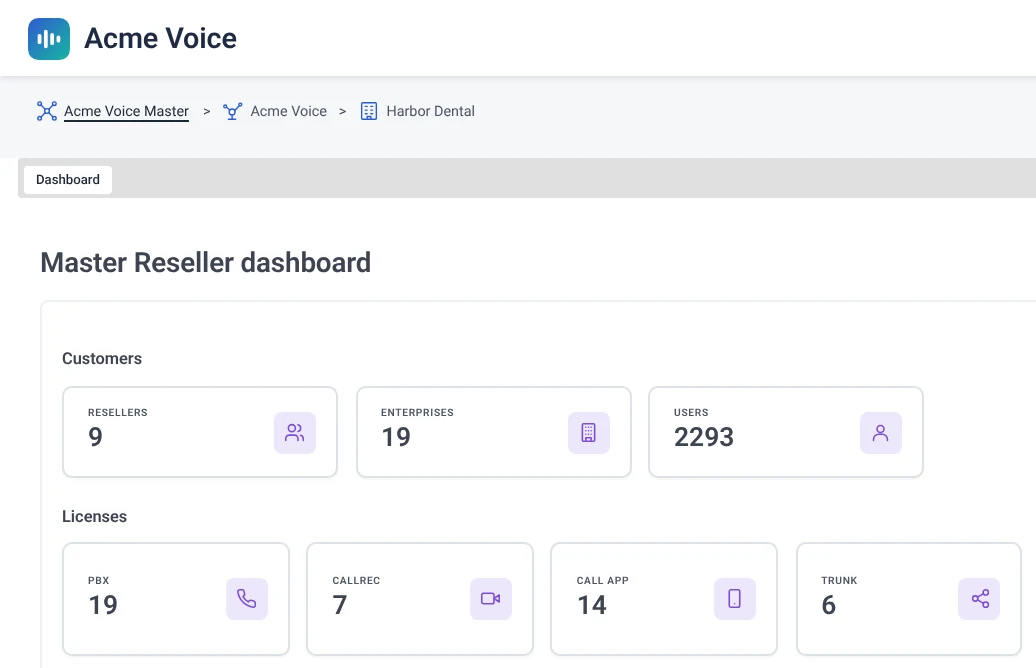
Every product runs on what you already operate and is managed in a portal branded as yours. Where a product adds a Teams app, that app carries your brand too.
You and your customers' admins manage users, numbers and settings in a portal branded as yours.
Each level of administration gets its own view of the portal. A Master Reseller creates and manages Resellers. A Reseller creates and manages business customers. An Enterprise Administrator manages only their own business.
PBX Connector, SMS Connector and ACS Call App add a Teams app with your name and logo. Operator Connect Express and Direct Routing use native Teams calling.

From Direct Routing through user provisioning and custom Teams application creation, TeamMate has automated the process.



A programmatic interface for authentication and all facets of provisioning available in the TeamMate portal.
POST /enterprise/configureUser
Host: api.example.com
Authorization: Bearer <access_token>
Content-Type: application/json

{
  "loginID": "harbordental-admin",
  "tenantID": "6f2c1d84-3b7e-4a19-9c52-0e8d4b7a2f61",
  "teamsUserId": "[email protected]",
  "firstName": "Riley",
  "lastName": "Chen",
  "phoneNumber": "14125550176",
  "pbxLocation": "harbor-dental-main",
  "pbxUserId": "176",
  "sbcGatewayId": 12
}
200 OK
Enterprise Admins are usually sent a registration email that takes them to the Enterprise Portal. With Bespoke Enterprise Access, you run registration, Microsoft consents and provisioning inside your own portal. There is no registration email, and your customers' admins stay in your environment.
Ask us about Bespoke Enterprise Access →Create the enterprise through the API and assign its services, SBC gateways and PBX types.
Call /enterprise/getActionItemUrl for the action you need, such as registration, admin login or a consent, with your callback URL.
Show the URL as a button or link in your portal. The Enterprise Admin clicks it and approves the permissions on the Microsoft consent screen.
The broker processes the response and redirects to your callback URL, with an MSAL object for registration or login and a status message for consents.
Configure PBX Connector, ACS Call App and SMS Connector users. With the "Allow Management by Service Provider" consent, you can handle most management tasks on the admin's behalf, including provisioning users, syncing users and creating direct routes.
The TeamMate Connector runs entirely on Microsoft Azure and integrates with Microsoft PowerShell and the Microsoft Graph API.
SOC 2 Type 2 certified. Independently audited, with security, availability and confidentiality controls monitored continuously.
Start with one product and add more per customer. You can mix products in a single Microsoft tenant.
Put your cloud or on-prem PBX on the native Teams dial pad. Connect one or several PBXs per tenant.
Learn more →VoiceA brandable add-on to PBX Connector. Calling in Teams with no Microsoft Phone System licenses required.
Learn more →VoiceAutomated build and management of Direct Routing, including users, settings and call paths.
Learn more →VoiceThe provisioning experience of Operator Connect, available without a certification program.
Learn more →VoiceTeams Phone setup and management, switched on per enterprise in the partner portal.
Learn more →VoiceConversational call answering and routing inside Teams Phone.
Learn more →VoiceCompliance recording for calls and meetings, including a payment (PCI) pause and resume.
Learn more →MessagingWhite-label SMS and MMS in Teams, with shared team inboxes per number.
Learn more →MessagingReal-time chat between Teams, Slack and Webex, with threads, reactions, files and presence.
Learn more →See the platform running with Microsoft Teams in a live demo, or start a proof of concept.
Free 30-day proof of concept for service providers.