How do you keep a hosted PBX customer who is moving to Microsoft Teams? Move into Teams with them instead of competing against it. When a business standardizes on Teams, the phone system is the next decision, and Microsoft makes Teams Phone the easy default. A service provider that connects its existing PBX to Teams can keep the customer's phone numbers, call features, billing relationship and brand, while users make and take calls in the app they already work in. Moving to Teams changes where people click. It only becomes churn if someone else leads the conversation.
I hear from UCaaS and hosted PBX providers who are watching this play out one account at a time. The pattern is familiar: the customer rolls out Teams for chat and meetings, IT starts asking why calls live in a separate app, and a Microsoft partner or an Operator Connect carrier shows up with a tidy answer.
Why are business customers moving to Teams?
Because Teams is already where they work. Chat, meetings and files are in one place, and the phone is the last thing still living somewhere else. Microsoft is clear about the ambition. Its Teams Phone page says "Teams Phone replaces traditional PBXs."
Licensing makes the default easy to reach. Microsoft's Teams add-on licensing documentation describes Teams Phone Standard as an add-on that provides PBX capabilities "such as cloud voicemail, call forwarding, call transfer, auto attendants, call queues, and caller ID." Microsoft also sells a Teams Phone with Calling Plan bundle, listed in the US at $17.00 per user per month, paid yearly, and states that "a phone system and audio conferencing are included in Office 365 E5 and Microsoft 365 E5."
Packaging keeps shifting, too. Since April 1, 2024, new enterprise customers buy Microsoft 365 or Office 365 suites without Teams plus a separate Teams license. Microsoft's July 1, 2026 pricing update raised Microsoft 365 E5 from $57 to $60 per user per month, and standalone Teams SKUs weren't part of it. Every renewal is a moment when IT looks at what it already pays Microsoft for. If an E5 customer is already paying for a phone system in Teams, expect the question "why are we paying twice?"
What do you lose when a customer moves to Teams Phone?
More than the seat count suggests:
- Seats. Each user who moves to Microsoft calling is a recurring line that leaves your invoice.
- Numbers. Numbers are what make leaving painful, and once they port out, the customer has nothing left to come back for. On a Microsoft Calling Plan, Microsoft says plainly: "After you import your phone numbers, Microsoft will become your service provider."
- Features. The call flows, IVRs, ring groups, integrations and reporting you configured over years get rebuilt on someone else's platform, or dropped.
- Margin. You lose the per-seat revenue and the add-ons that sit on top of it: recording, SMS, contact center, analytics.
The quietest loss is the relationship. When you're no longer on the phone bill, you're no longer in the room when the customer plans what comes next.
What are your options when a customer standardizes on Teams?
There are four realistic paths. None is wrong for every provider, and Microsoft's PSTN connectivity documentation notes that a single Teams tenant can combine several connectivity options.
Do nothing
Some customers will keep their desk phones and live with two apps. That costs you nothing today. The risk is that users drift toward Teams calling, the PBX starts to look like legacy, and the decision gets made at renewal without you.
Become an Operator Connect carrier
Operator Connect lets customers enable a certified operator in the Teams admin center and assign that operator's numbers to users. Microsoft's operator program page lists what operators get: direct peering over Microsoft Azure Peering Service for Voice, number provisioning through APIs, a presence in the Teams admin center, and call-detail and call-quality data through APIs. Joining runs through Microsoft's onboarding process: registration, readiness assessment, agreement signing "based on onboarding slot availability," onboarding, and a GA readiness evaluation.
The trade-off: you stay on the bill for PSTN, but Teams Phone becomes the phone system. Your PBX features are replaced by Microsoft's, and every user needs a Teams Phone license, which Microsoft lists as a prerequisite.
Direct Routing
Direct Routing connects a Microsoft-certified session border controller (SBC) to Teams Phone, so you can bring any carrier. Microsoft calls it a good fit for organizations that "require integration with third-party PBXs or analog devices." It's flexible and doesn't require joining a program. In exchange, you or the customer run the SBC, certificates, DNS and firewall rules. Microsoft's operator page describes Direct Routing number provisioning as "Limited" (through PowerShell only). Users still need Teams Phone licenses.
Integrate your PBX with Teams
The fourth path keeps your PBX as the phone system and makes Teams the place users call from. The customer gets calling inside Teams, and you keep the platform, the numbers and the invoice. Be honest about the trade-offs, too. You keep owning the PBX and investing in it. And if a customer's strategy is to retire every third-party phone system, an integration is a bridge, not a destination.
How does a PBX-to-Teams integration keep your features, numbers, billing and brand?
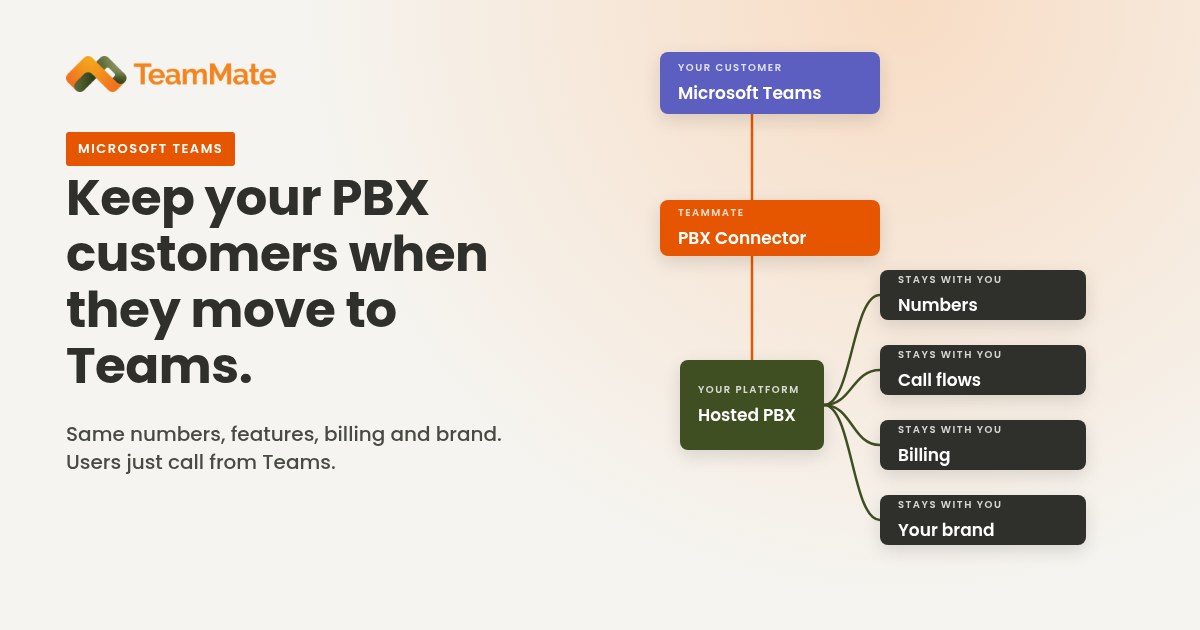
It changes the front end and leaves the business relationship alone. TeamMate PBX Connector connects 80+ PBX types to Teams. In every deployment:
- Numbers stay on your platform. There's no port-out and no hand-off to another carrier.
- Features stay where you built them. The call flows, queues and integrations you configured keep running on your PBX.
- Billing stays with you. The customer keeps one phone bill, and it's yours.
- Brand stays yours. The service is delivered under your name.
Licensing is a cost lever. PBX Connector on its own requires a Teams Phone license for each user. Add the ACS Call App, an add-on that requires PBX Connector, and no Teams Phone license is needed, which takes a per-user Microsoft cost out of the customer's bill. The ACS Call App's mobile companion app runs on iOS and Android only, with no desktop app, and is built on Microsoft's Azure Communication Services Calling SDK.
If you want to become an Operator Connect carrier yourself, Operator Connect Express gets you there quickly. It deploys in days, with numbers bulk uploaded or provisioned by API. SIP Trunk Connector rounds out the connectivity options.
All of it runs 100% on Microsoft Azure in 9 regions, and TeamMate is SOC 2 Type 2. More than 30 partners and 500+ service providers in 18 countries use the platform.
How do you keep an account that's at risk? A retention playbook
1. Spot the accounts at risk
You usually get warning signs before a port-out request. Watch for:
- A Microsoft 365 or Teams rollout, or an upcoming Microsoft renewal date.
- A move to E5, which already includes a phone system.
- Help-desk tickets asking to call from Teams, or about using two apps.
- A new IT lead or Microsoft partner joining the account.
- Requests for number lists, porting details or contract end dates.
Put these flags in your CRM and review them every month with your account managers.
2. Lead the conversation before Microsoft does
Don't wait to be asked. Bring the Teams calling plan to the customer yourself: what stays the same (numbers, call flows, support, invoice), what changes (users call from Teams), and what it takes to get there. Ask which Microsoft licenses they already own so the comparison is real, not theoretical. The provider who frames the decision first usually wins it.
3. Offer a hybrid of PBX and Teams
Not every user needs the same thing. Office staff might call from Teams, while reception, warehouse phones, analog devices and contact center agents stay on the PBX. Microsoft's own Direct Routing guidance shows mixed deployments where legacy PBXs and analog devices sit alongside other connectivity options. Start with one department as a pilot, prove call quality, then expand.
4. Upsell the add-ons
Once calls flow through Teams, there's more to sell. Teams Call Recording and AI Voice Agents are white-label. AI Voice Agents supports 40+ languages with sub-100ms response. SMS Connector adds SMS, and ChatBridge adds chat federation. If a customer asks why they shouldn't just use Microsoft's AI, I've answered that in Why Not Just Use Microsoft's Own AI?
Frequently asked questions
Do users need a Teams Phone license to make outside calls in Teams?
For Microsoft's own PSTN connectivity options, yes. Microsoft says the user account "must be licensed with the Teams Phone application and also be equipped with a PSTN solution." That applies to Calling Plans, Operator Connect, Teams Phone Mobile and Direct Routing.
What is the difference between Operator Connect and Direct Routing?
Operator Connect is a Microsoft program for certified operators, who connect through Azure peering and provision numbers into the Teams admin center through APIs. Direct Routing connects any carrier through a certified session border controller that you, the customer or a partner manages.
Do users need a Teams Phone license with PBX Connector?
With PBX Connector on its own, yes: each user needs a Teams Phone license. With the ACS Call App add-on, which requires PBX Connector, no Teams Phone license is needed. The ACS Call App's mobile companion app runs on iOS and Android only; there is no desktop app.
Can customers keep their phone numbers when they move to Teams?
Yes. With a PBX-to-Teams integration, numbers stay with the current provider. If a customer ports numbers to a Microsoft Calling Plan, Microsoft becomes their service provider.
Keep the customer when they move to Teams
Your customers are going to call from Teams either way. The question is whose numbers, features and invoice come along. See how TeamMate PBX Connector works: connect 80+ PBX types to Teams under your own brand, and keep the customer.