
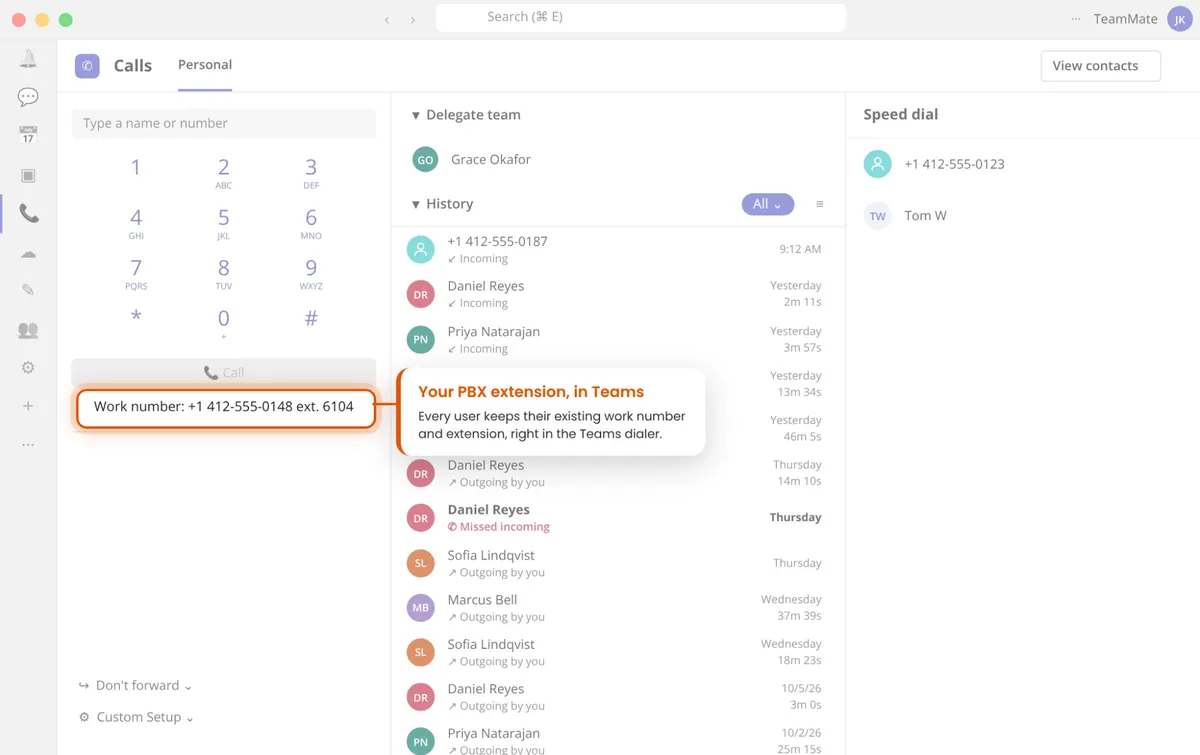
Make and take 3CX calls on the Teams dial pad. Each Teams user registers to their own 3CX extension, so numbers, queues and voicemail keep working, and nothing changes on your 3CX.
Free 30-day proof of concept for service providers.
It connects your 3CX phone system to Microsoft Teams so people can handle their 3CX calls without leaving Teams. TeamMate does this with PBX Connector: each Teams user registers to their own 3CX extension, and TeamMate automates the Direct Routing link and supplies the session border controllers. Your 3CX stays the phone system. Teams becomes the place people use it.
Teams Calls becomes a softphone on 3CX, using the user’s 3CX number or extension, on desktop, browser and mobile.
Hold, transfer and voicemail still run on 3CX. Custom soft keys put the 3CX functions you choose one tap away.
New 3CX voicemail notifications arrive in Teams, so messages are not missed away from the desk phone.
On a 3CX call, Teams shows On a Call automatically. Presence Pause stops calls ringing through to Teams during meetings.
Transfer a 3CX call to anyone in Teams, with the transfer reported back to 3CX. How Pro Transfer works
Show caller details from your CRM or other systems as a card in Teams before the call is answered.
Many 3CX partners package TeamMate with 3CX in one of two ways, and you can use both for different customers.
Each Teams user registers to their own 3CX extension, so 3CX queues, transfers, voicemail and presence carry over to Teams. PBX Connector
Connect 3CX to Teams as a SIP trunk, and TeamMate automates the Direct Routing build, users and call paths. SIP Trunk Connector
Sell either option as your own service, with a white-label portal and Teams app.
Add your branding and connect the customer’s Microsoft 365 tenant with minimal permissions.
Enter the 3CX hostname, transport, port and voicemail feature code, then each user’s extension, SIP ID and authentication details. TeamMate builds the Direct Routing link.
3CX calls ring in Teams on desktop, browser and mobile, alongside 3CX apps and desk phones.
Most 3CX and Teams integrations use one of three approaches. They differ in where the call is answered and how many 3CX features come along.
A Teams app opens a separate 3CX softphone. Calls move out of Teams, and you support a second client on every desktop.
3CX also rings a separate Teams number. Calls are answered in Teams, but 3CX features are lost and each user needs an extra number or trunk.
Each Teams user registers to 3CX like any SIP phone. Calls are answered in Teams with 3CX features kept and no extra number per user.
TeamMate also connects Mitel, BroadWorks, Metaswitch, NetSapiens, Avaya, Cisco to Microsoft Teams, along with 80+ PBX types and variants tested with PBX Connector.
Yes. TeamMate PBX Connector registers each Teams user to their own 3CX extension, so 3CX calls ring on the Teams dial pad on desktop, browser and mobile, with 3CX features like queues, transfer and voicemail.
The 3CX hostname, transport type and port, any SIP proxy or alternate domain, and the voicemail feature code. For each user: the 3CX extension, SIP user ID, authentication ID and password.
Use PBX Connector when you want each Teams user to be a 3CX extension with 3CX features. Use SIP Trunk Connector when you want Teams to handle calling natively, with 3CX as the trunk.
Yes. When a user is unavailable in Teams, for example in a meeting, Presence Pause can set them to Do Not Disturb on 3CX so calls follow their busy handling. This uses the standard SIP event package (RFC 6665), which 3CX supports.
With PBX Connector, yes, as with any Direct Routing setup. If you would rather not buy Teams Phone licenses, the ACS Call App add-on lets users make and take calls in Teams without them.
An SBC is needed for any SIP connection to Microsoft Teams, and it is included. TeamMate runs SBCs in 9 Microsoft Azure regions, so there is nothing to install.
Yes. Service providers get a white-label portal and a Teams app with their own name and logo, and can provision customers in the portal or through a REST API. With Bespoke Access, customers can even complete Microsoft setup inside your own portal.
It is priced per user, per month. Service providers can start with a free 30-day proof of concept on their own system.
See it in a live demo, or start a proof of concept on your own 3CX system.
Free 30-day proof of concept for service providers.