
Make and take Mitel calls on the Teams dial pad. Each Teams user becomes a real Mitel extension, so your numbers, hunt groups and voicemail keep working, and nothing changes on your Mitel system. Works with Mitel MiVoice and MX-ONE.
Free 30-day proof of concept for service providers and Mitel dealers.
It connects your Mitel phone system to Microsoft Teams so people can handle their Mitel calls without leaving Teams. TeamMate does this with PBX Connector: each Teams user registers to their own Mitel SIP extension, and TeamMate automates the Direct Routing link and supplies the session border controllers. It works with Mitel MiVoice and MX-ONE. Your Mitel stays the phone system. Teams becomes the place people use it.
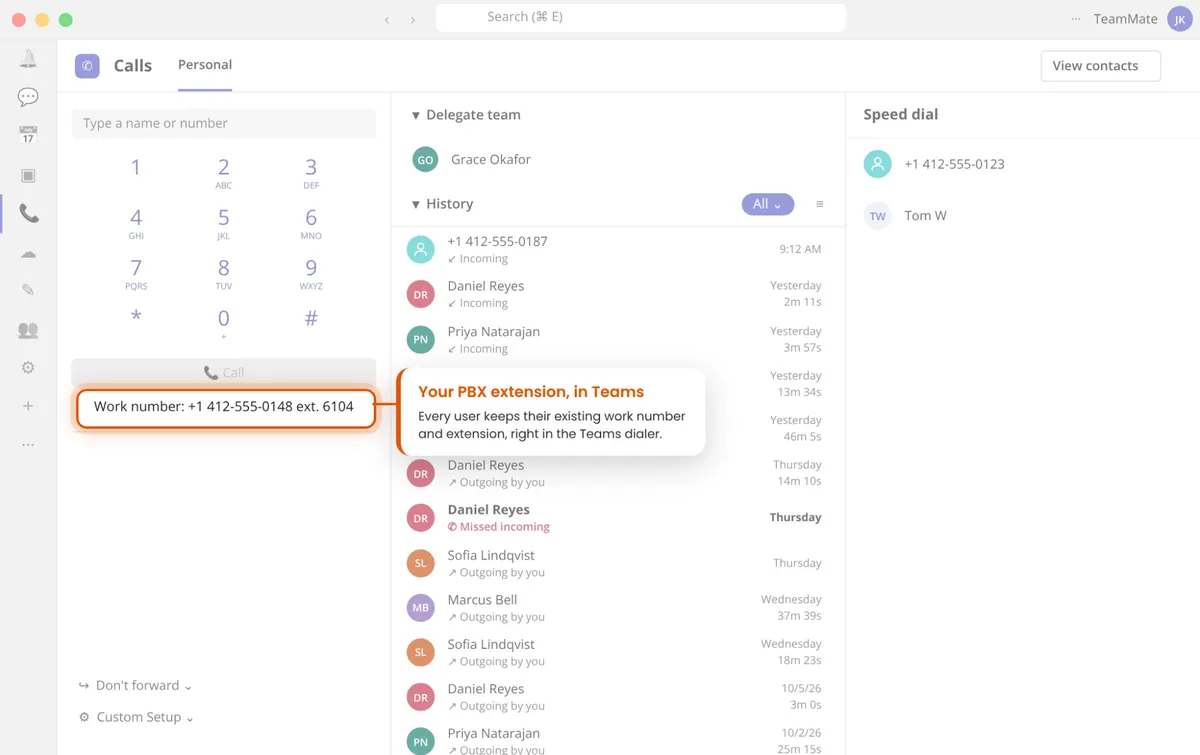
Teams Calls becomes a softphone on your Mitel system, using the user's Mitel DID or extension, on desktop, browser and mobile.
Hold, transfer, hunt groups and voicemail still run on Mitel. Custom soft keys put the Mitel functions you choose one tap away.
On a Mitel call, Teams shows On a Call automatically. Presence Pause stops calls ringing through to Teams during meetings.
New Mitel voicemail notifications arrive in Teams, so messages are not missed when people work away from their desk phone.
Show caller details from your CRM or other systems as a card in Teams before the call is answered. A large financial institution uses this to give agents context on every inbound call.
Transfer a Mitel call to any Teams user, with real status updates sent back to Mitel. How Pro Transfer works.
Most Mitel and Teams integrations use one of three approaches. They differ in where the call is answered and how many Mitel features come along.
A Teams app opens a separate Mitel softphone. Calls move out of Teams, and you support a second client on every desktop.
Mitel also rings a separate Teams number. Calls are answered in Teams, but Mitel features like park, hunt groups and the voicemail indicator are lost, and each user needs an extra number or trunk.
Each Teams user registers to their own Mitel extension. Calls are answered in Teams with Mitel features kept, no extra number per user, and the same provisioning you already use for Mitel softphones.
On MiVoice Business, add each user's Teams extension to a Mitel Multi-Device User Group (MDUG) with their desk phone. A call to the user's number then rings Teams and the desk phone at the same time, and they answer on whichever is closer. See Mitel's documentation on Multi-Device User Groups.
An MDUG groups up to eight of a user's phones under one directory number, so the desk phone, Teams and other devices all ring when that number is called.
Only the prime phone, usually the desk phone, needs a full MiVoice Business IP User License. The group uses a Multi-Device User license instead of a license per device.
When the user is on a call on any device, Mitel treats the others as busy, so a second call follows the user's busy handling instead of ringing Teams.
Add your branding and connect the customer's Microsoft 365 tenant with minimal permissions.
Create a SIP extension for each Teams user on Mitel and enter the details. TeamMate builds the Direct Routing link automatically.
Mitel calls ring in Teams on desktop, browser and mobile, alongside desk phones and Mitel softphones.
TeamMate was selected for the Mitel Unified Communications Accelerator, run by Mitel and L-SPARK, to deepen its Teams integration for Mitel customers and dealers. Read the announcement and our interview with L-SPARK.
TeamMate also connects 3CX, BroadWorks, Metaswitch, NetSapiens, Avaya, Cisco to Microsoft Teams, along with 80+ PBX types and variants tested with PBX Connector.
Yes. TeamMate PBX Connector registers each Teams user to their own SIP extension on your Mitel system, so Mitel calls ring on the Teams dial pad on desktop, browser and mobile, with Mitel features like hold, transfer, hunt groups and voicemail.
No. Your Mitel system, phone numbers, call routing and carriers stay as they are. Teams becomes another endpoint for the same Mitel users, much like a desk phone or a Mitel softphone.
TeamMate works with Mitel MiVoice and MX-ONE. It connects over SIP, the same way a SIP softphone does, so each Teams user registers to their own MiVoice or MX-ONE extension. Mitel is among the 80+ PBX types and variants TeamMate has tested. Running another Mitel system? Tell us which one and we will confirm before you start.
Yes. On MiVoice Business Release 6.0 or later, add the user's Teams extension to a Multi-Device User Group (MDUG) with their desk phone. Calls to the user's number ring both, and only the desk phone needs a full IP User License. MDUGs are a MiVoice Business feature and are not available on MX-ONE.
With PBX Connector, yes, as with any Direct Routing setup. If you would rather not buy Teams Phone licenses, the ACS Call App add-on lets users make and take Mitel calls in Teams without them.
An SBC is needed for any SIP connection to Microsoft Teams, and it is included. TeamMate runs SBCs in 9 Microsoft Azure regions, so there is nothing to install on site.
Yes. When a user is on a Mitel call, their Teams status changes to On a Call automatically. Presence Pause stops calls ringing through to Teams during meetings or focus time.
Yes. Dealers and service providers get a white-label portal and a Teams app with their own name and logo, and can provision customers in the portal or through a REST API.
It is priced per user, per month. Service providers and Mitel dealers can start with a free 30-day proof of concept on their own Mitel system.
See it in a live demo, or start a proof of concept on your own Mitel system.
Free 30-day proof of concept for service providers.