Ask a customer whether their Microsoft Teams calls are recorded and many will say yes. Teams has a record button, after all. But that button only works when someone remembers to click it, and the file lands in that person's OneDrive, where it expires after 120 days by default.
That's fine for a meeting recap. It's not fine when a client disputes what they agreed to, an auditor asks for last year's sales calls, or a manager wants to coach a new hire on real conversations.
Teams Call Recording closes that gap. Here's what makes it different from built-in recording, and seven ways customers put it to work.
What Teams records on its own
Microsoft describes built-in Teams recording as a convenience feature: a user chooses to record a call or meeting for their own use. For automatic, policy-based recording, Microsoft points customers to third-party solutions. The difference comes down to three questions:
- Who starts it? Built-in recording depends on the user. Compliance recording runs automatically, set by an admin.
- Who owns it? Built-in recordings belong to the user. Compliance recordings belong to the business.
- How long does it last? Built-in meeting recordings expire on a timer unless someone changes it. Compliance recordings follow the retention the business sets.
What makes TeamMate Teams Call Recording different
Every call, automatically
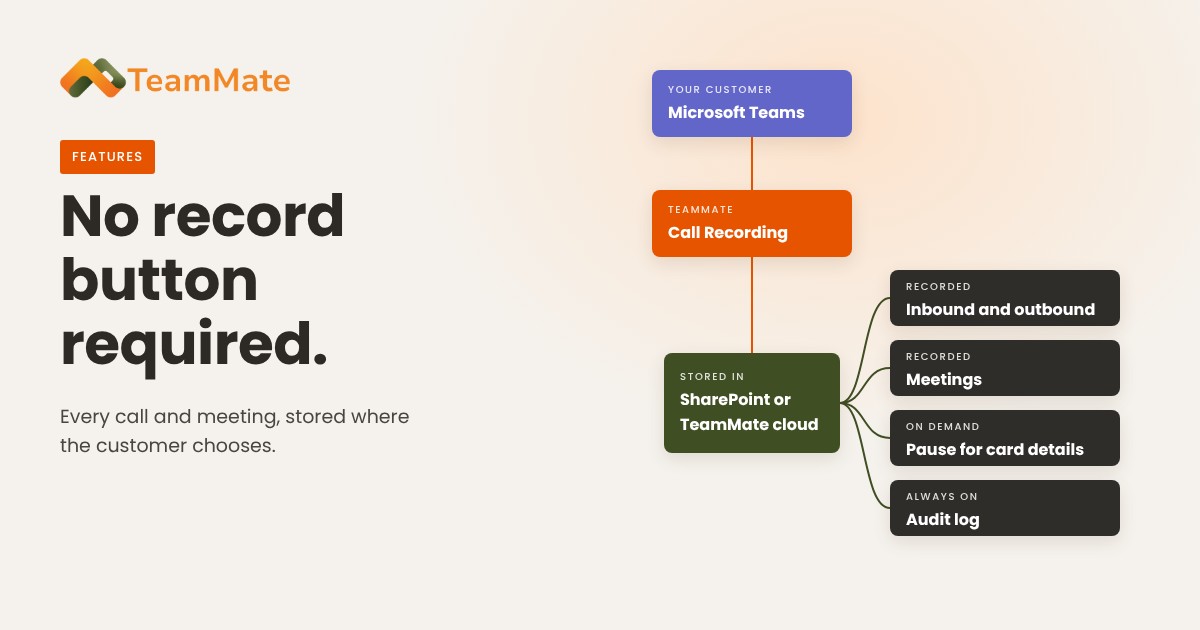
Once a user is enabled, all inbound and outbound calls are recorded, along with federated calls, conference calls and the meetings they organize. Nobody has to remember anything.
Meetings are covered, even when someone else organizes them
If a recorded user joins a meeting, the meeting is recorded, even when the organizer isn't a recorded user. That matters for advisors, agents and account managers who join meetings their clients set up.
Pause and resume from an Adaptive Card
Admins can let users pause recording during a call. An Adaptive Card in Teams shows Pause Recording and Resume Recording buttons, and participants hear when recording stops and starts. It's a simple way to keep card numbers and other sensitive details out of the recording. For card payments, use it alongside the business's full PCI DSS controls, since pausing a recording doesn't take the rest of the call path out of scope.
Your storage, your retention
Recordings are stored in the TeamMate cloud or in the customer's own SharePoint, with retention the customer defines.
Control who listens
Users sign in to the recording portal with their Microsoft account, so there are no extra passwords. Role groups limit who can search and play back recordings, and the audit log shows who accessed which recording.
Built for partners
Teams Call Recording is white-label, so service providers sell it under their own brand. It runs on Microsoft Azure, and TeamMate is SOC 2 Type 2 certified.
7 use cases worth selling
1. Financial advisors and broker-dealers
Recordkeeping is still a top exam focus. FINRA's 2026 oversight report flags recordkeeping lapses again and again. For firms that record client calls, automatic recording plus an audit trail of who listened gives compliance teams a record they can actually produce.
2. Medicare and insurance agencies
Sales and marketing calls for Medicare plans must be recorded and kept. Under rules that apply to 2027 marketing starting October 1, 2026, CMS requires those recordings to be kept for six years, down from ten. Agencies working in Teams need recording that runs on every call and retention they control.
3. Phone payments
Retail, hospitality, home services and nonprofits still take card numbers over the phone. Pause and resume lets the agent stop the recording while the card is read out, then pick it back up for the rest of the call.
4. Healthcare and dental front desks
Scheduling, billing and referral calls are where disputes start. A recording settles "I was told..." in minutes. Keeping recordings in the practice's own SharePoint keeps them inside the environment it already manages.
5. Legal and professional services
Client instructions given by phone, scope changes and billing questions are easier to stand behind with a recording. Role-based access keeps playback limited to the people who need it.
6. Contact centers, help desks and MSP service desks
Recordings are the best training material a team has. Supervisors can review real calls for quality, coach on specific moments, and onboard new hires with examples from the business's own customers.
7. Sales teams
Verbal approvals, order changes and "that's not what we agreed to" moments. A searchable recording protects the deal and the rep.
Record responsibly
Recording rules differ by place. Some US states require consent from every party on the call, and other countries set their own notice rules. In Canada, the Office of the Privacy Commissioner updated its guidance for businesses that record customer calls on October 8, 2026. Help customers set the right notice, and set retention to match the rule that applies to them, not a default.
Add recording to every tenant
For service providers, Teams Call Recording is switched on per tenant, with recording policies by tenant, user or security group. It's a recurring add-on to the Teams voice service customers already buy from you, and there's a free 30-day proof of concept.
See it in action. Learn more about Teams Call Recording or book a demo.