Introduction to Teams-Webex Integration
Microsoft Teams and Cisco Webex represent two of the most widely deployed collaboration platforms in enterprise environments. While Teams dominates Microsoft-centric organizations, Webex maintains strong adoption in enterprises with Cisco infrastructure investments.
This creates a common challenge: teams using different platforms cannot communicate effectively, leading to information silos and reduced collaboration efficiency.
Chat federation solves this problem by creating seamless communication bridges between Teams and Webex, enabling real-time message exchange while preserving platform-native experiences.
What is Microsoft Teams Webex Chat Federation?
Chat federation is the process of connecting disparate communication platforms to enable seamless message exchange. In the context of Teams and Webex, federation allows:
- Cross-platform messaging: Teams users can communicate directly with Webex users
- Real-time synchronization: Messages appear instantly on both platforms
- Identity preservation: User avatars, names, and context are maintained
- Rich media support: Files, images, and reactions work across platforms
- Security compliance: Enterprise-grade encryption and audit trails
Why Organizations Need Teams-Webex Integration
Common Scenarios
Merger and Acquisition: Companies using different platforms need to maintain communication during integration periods.
Partner Collaboration: External partners may use Webex while your organization standardizes on Teams.
Department Preferences: Different business units may have platform preferences based on specific workflow requirements.
Legacy Infrastructure: Organizations with existing Cisco investments may maintain Webex alongside newer Teams deployments.
Business Benefits
- Improved Collaboration: Remove platform barriers to communication
- Reduced Training: Users stay in familiar environments
- Cost Optimization: Maintain existing investments while adding integration
- Enhanced Productivity: Eliminate context switching between platforms
- Future Flexibility: Gradual migration options without disruption
ChatBridge: Leading Teams-Webex Integration Solution
ChatBridge is TeamMate Technology’s enterprise chat federation platform, specifically designed to connect Microsoft Teams with Webex (and Slack) in secure, scalable deployments.
Key Features
- Bidirectional Messaging: Full two-way communication between Teams and Webex
- Identity Mapping: Automatic user recognition across platforms
- Rich Content Support: Files, images, formatting, and emoji reactions
- Channel Federation: Connect specific Teams channels with Webex spaces
- Security Compliance: SOC 2 Type 2 certified with enterprise encryption
- Admin Controls: Granular permissions and management capabilities
- Audit Logging: Comprehensive tracking for compliance requirements
Enterprise Advantages
- Three-Platform Support: Teams, Webex, AND Slack integration
- White-Label Deployment: MSP and reseller customization options
- Multi-Tenant Architecture: Designed for service provider environments
- API Management: Comprehensive automation and integration capabilities
- Scalable Infrastructure: Enterprise-grade performance and reliability
How ChatBridge Connects Teams and Webex
Technical Architecture
ChatBridge operates as a secure bridge between the Microsoft Graph API (Teams) and Cisco Webex APIs, creating real-time synchronization while maintaining platform-native security models.
Implementation Process
Step 1: Deployment
- Install ChatBridge from Microsoft Teams admin center
- Configure Webex API connections
- Set up authentication and permissions
Step 2: Configuration
- Map Teams channels to Webex spaces
- Configure user identity synchronization
- Set federation rules and policies
Step 3: Testing and Rollout
- Pilot with select user groups
- Verify message flow and feature functionality
- Gradual expansion to full organization
Security and Compliance Considerations
Enterprise Security Features
- SOC 2 Type 2 Certification: Audited security controls
- End-to-End Encryption: Message protection in transit and at rest
- Identity Verification: Authenticated user mapping between platforms
- Access Controls: Granular permissions management
- Data Residency: Configurable storage locations for compliance
Compliance Capabilities
- Audit Trails: Comprehensive logging for all federation activities
- Data Loss Prevention: Policy enforcement across platforms
- eDiscovery Support: Legal hold and search capabilities
- Retention Policies: Configurable message retention rules
Alternative Integration Approaches
Native Webex-Teams Integration
Cisco offers limited Teams integration through Webex for Microsoft Teams, but this provides calling integration rather than comprehensive chat federation.
Custom API Development
Organizations can build custom integrations using Teams and Webex APIs, but this approach requires significant development resources, ongoing maintenance, and security expertise.
Third-Party Alternatives
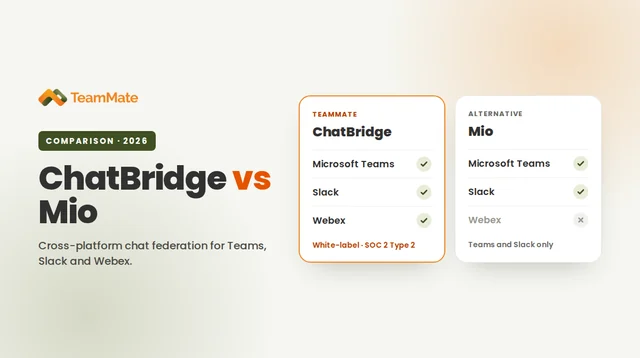
While solutions like Mio provide Teams-Slack integration, ChatBridge is unique in supporting Teams-Webex federation alongside comprehensive three-platform coverage.
Use Cases and Success Stories
Manufacturing Enterprise
A global manufacturing company with Teams in corporate offices and Webex in manufacturing facilities used ChatBridge to enable seamless communication between operational and administrative teams.
Healthcare System
A healthcare network maintained Webex for clinical communications while implementing Teams for administrative functions. ChatBridge enabled coordinated care delivery across both platforms.
Technology Partnership
A software company using Teams needed to collaborate with a Cisco partner organization using Webex. ChatBridge facilitated joint development projects without requiring platform changes.
Implementation Best Practices
Planning Phase
- Assess Current Usage: Understand existing Teams and Webex deployments
- Identify Key Users: Determine which groups need cross-platform communication
- Define Policies: Establish federation rules and security requirements
- Plan Pilot: Select representative user groups for initial testing
Deployment Phase
- Staged Rollout: Gradual expansion from pilot to full deployment
- User Training: Education on federated communication workflows
- Support Resources: Documentation and help desk preparation
- Performance Monitoring: Track usage and identify optimization opportunities
Optimization Phase
- Usage Analytics: Monitor federation patterns and user adoption
- Policy Refinement: Adjust rules based on real-world usage
- Integration Expansion: Add additional channels and user groups
- Long-term Strategy: Plan for platform consolidation or continued federation
Conclusion
Microsoft Teams and Webex chat federation addresses a critical need for organizations operating in multi-platform communication environments. ChatBridge provides the most comprehensive solution for connecting these platforms with enterprise-grade security, comprehensive feature support, and scalable architecture.
Whether your organization is managing merger integration, partner collaboration, or platform migration scenarios, ChatBridge enables seamless communication between Teams and Webex users without compromising security or user experience.
Ready to implement Teams-Webex integration? Contact TeamMate Technology to learn how ChatBridge can bridge your organization’s communication platforms with enterprise security and comprehensive feature support.