It's 4:52 on a Thursday. Maya, a product manager, needs IT to approve laptops for three engineers who start Monday. Maya works in Slack. IT works in Microsoft Teams. So she does what everyone does: she writes an email, copies her manager and hopes.
Sam in IT sees it Friday afternoon. The laptops ship Tuesday. Three new engineers spend their first day watching onboarding videos on their phones.
Nobody did anything wrong. The two halves of the company just couldn't hear each other.
This is an example scenario, not a specific customer. If you've been through an acquisition, it will feel familiar.
How one company ended up with two chat apps
The parent company runs on Microsoft Teams. IT, finance, HR and sales all live there. Six months ago it bought a 60-person software company that has run on Slack since its first hire.
That team has years of channels, history and habits in Slack. Making them move in week one would have burned goodwill the company couldn't afford to lose. So leadership made the sensible call: don't force it yet.
Sensible. Also the start of a slow-motion mess.
What two apps actually cost
Within a month, the workarounds were everywhere:
- The email detour. Anything that crossed from Slack to Teams turned into an email. A two-minute question became a two-day thread.
- Screenshot diplomacy. People pasted Slack threads into Teams and Teams replies into Slack. Half the context fell off along the way.
- The guest account shuffle. A few people got guest access to the other side and spent the day flipping between two apps and two sets of notifications.
- The app war. At every all-hands, someone asked when "they" were going to switch. Both sides meant the other one.
The real cost wasn't the software. It was the delays, the duplicated work and two teams that started to feel like two companies.
Then there’s the cost nobody budgets for: risk.
- Missing something time-sensitive. A customer escalation, a security alert or a deadline change gets posted in one app. The people who need to act on it are in the other.
- The right information, too late. The answer existed. It just showed up after the decision was already made without it. Ask the three engineers with no laptops.
- Decisions made on half the picture. When context travels by screenshot and forwarded email, people act on whatever piece reached them.
- Frustration that builds. The acquired team starts to feel like outsiders. The parent company starts to feel ignored. That’s how good people start looking elsewhere.
None of this shows up on an invoice. All of it shows up eventually.
The fix: ChatBridge between Microsoft Teams and Slack
The company’s IT provider asked a different question. Not "who switches?" but "why does anyone have to?"
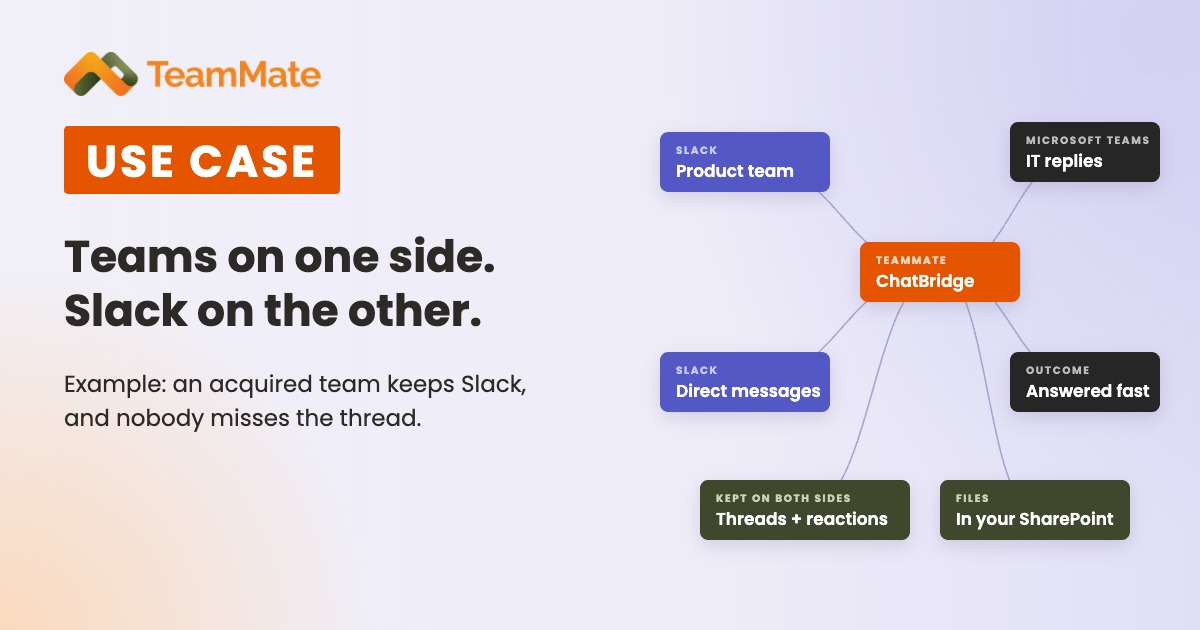
They set up TeamMate ChatBridge, which connects chat between Microsoft Teams and Slack in real time. Everyone stays in the app they already use.
Setup was three steps, not a project
An admin connected Microsoft Teams and Slack with standard OAuth and admin-consented permissions, chose which users should chat across platforms, and switched it on. Nothing went on anyone's laptop or phone. ChatBridge connects at the API and protocol level.
It works like real chat, because it is
This isn't a bot that pings you with notifications. Maya messages IT from Slack. Sam sees it in Microsoft Teams and replies there. The sender, threads and formatting all carry over, and so do emoji reactions. Edit or delete a message, and it changes on both sides. Direct messages work too.
Files land where IT wants them
With the Unified Connector App, people can share files across the bridge. Files are stored only in the company's own Microsoft 365 SharePoint. Messages are never saved, and connections use TLS 1.2 or higher.
Security had what it needed
TeamMate holds SOC 2 Type 2 certification, which covers ChatBridge. Audit logs keep metadata only.
Thursday at 4:52, take two
Same Thursday, same laptops. Maya asks in Slack. Sam approves it from Microsoft Teams and adds a thumbs-up. Maya sees both in Slack before 5:00. No email, no screenshot, no guest account. On Monday, the new engineers open their laptops.
Across the company, the change looked like this:
- Questions get answered in minutes, in the thread where they were asked.
- Context stays with the conversation instead of being pasted from app to app.
- IT has fewer guest accounts to manage and clean up.
- The app war cooled off. If the company ever moves to one app, it can plan that on its own schedule, not because chat is broken.
Slack today, something else tomorrow
The next acquisition might run on Zoom or Webex. A key partner might have its own Microsoft Teams tenant. ChatBridge covers those too. It connects Microsoft Teams with Slack, Zoom and Webex chat, and links Teams tenants from different organizations without guest access. For the full rundown, see How to Connect Microsoft Teams with Slack, Zoom and Webex.
Why this matters for partners
If you're a UCaaS provider or MSP, this conversation is already happening at your customers. Every merger, acquisition or joint project with two chat apps is a reason to call.
- Sell it under your brand. ChatBridge is white-label: your name, your domain and your pricing.
- One pane for every customer. Manage multiple customer tenants, and every internal and external federation, from one portal.
- Simple pricing. Per user, per month, with flexible plans for phased rollouts.
Try it with a real team
Start a free 30-day proof of concept and connect Microsoft Teams and Slack for one team that’s feeling the split today.
Have customers split between Microsoft Teams and Slack? See ChatBridge or book a demo.