Microsoft Teams has become the hub of business communication, bringing chat, meetings, collaboration and voice into one app. For organizations that want to handle business calls in Teams, telephony integration connects that app to the telephone network and to the voice infrastructure they already have.
There is no single way to do it. Some businesses want to replace their phone system with a cloud service. Others want to keep their PBX or their carrier, or want to offer Teams calling to their customers without rebuilding their network.
This guide explains how Teams telephony works, the main connectivity options, how to choose between them, and how businesses and service providers can plan a successful rollout.
In this guide:
- What Microsoft Teams telephony integration is, and how it works
- The difference between Calling Plans, Operator Connect, Direct Routing and Teams Phone Mobile
- How to connect an existing PBX or SIP trunk to Teams
- What service providers should look for in a white-label platform
- How to plan, deploy and support a Teams telephony solution
What is Microsoft Teams telephony integration?
Microsoft Teams telephony integration connects Teams to a business phone system, so users can make and receive calls in the Teams app.
Microsoft Teams Phone adds enterprise calling features to Teams, such as call transfer, call routing, voicemail, auto attendants and call queues. To call regular phone numbers, Teams Phone also needs a connection to the public switched telephone network (PSTN) through one of Microsoft's supported connectivity options.
A Teams telephony project usually takes one of these forms:
- Replacing an existing phone system with cloud calling
- Connecting Teams to an existing PBX or business phone system
- Connecting Teams to an existing telecom carrier
- A service provider delivering Teams-connected voice services to its business customers
The right approach depends on your existing infrastructure, calling requirements, preferred carrier and operating model.
How does Teams telephony work?
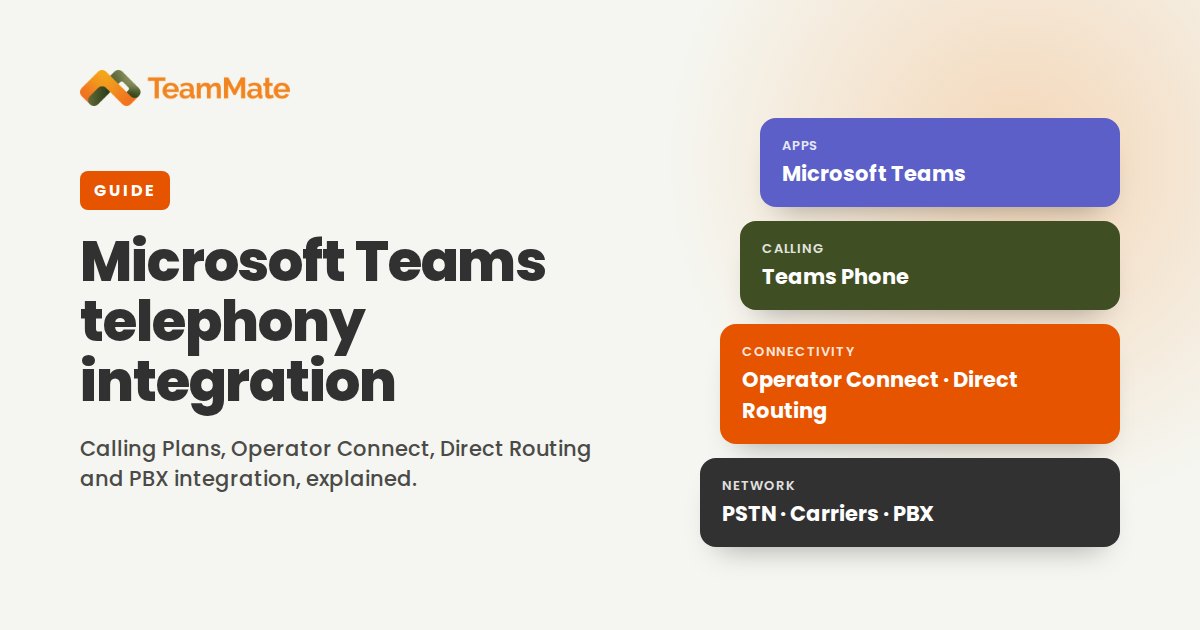
At a high level, a Teams telephony solution connects the Teams app to a calling platform (Teams Phone) and, for calls to outside numbers, to a PSTN connectivity service. A simplified architecture has four layers:
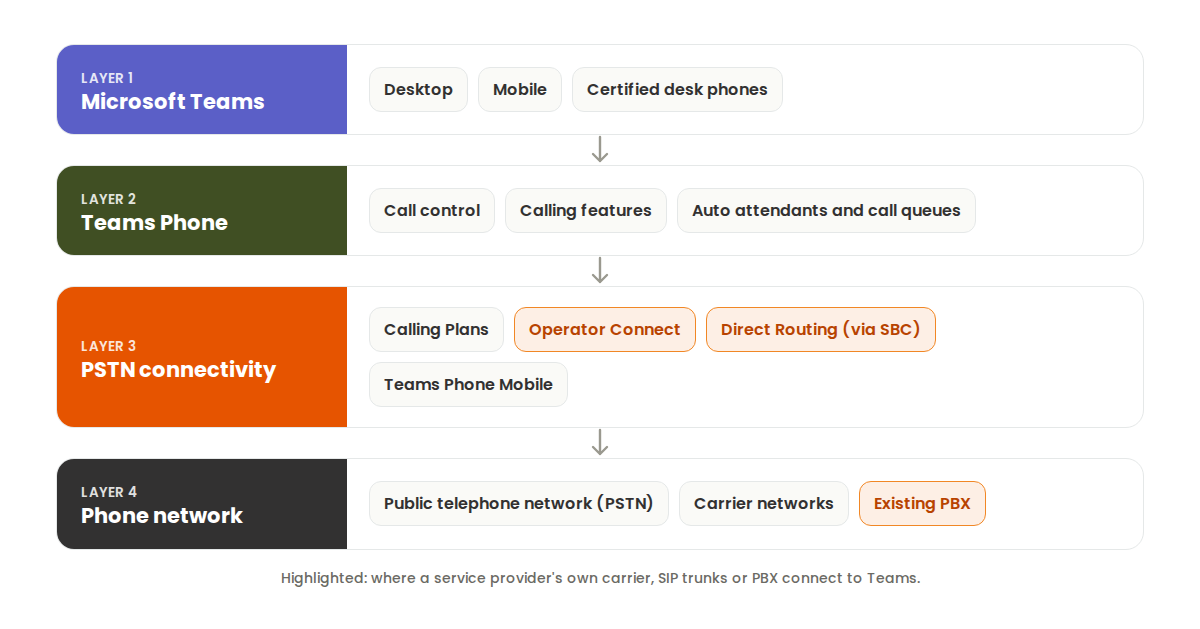
The details depend on the connectivity model. Direct Routing, for example, uses a certified Session Border Controller (SBC) to connect Teams Phone to your own telephony infrastructure. The other options rely on Microsoft or a participating operator to provide PSTN connectivity.
Your Teams telephony options
Microsoft supports four PSTN connectivity models. Each takes a different approach to carriers, infrastructure and deployment.
Microsoft Teams Calling Plans
With Calling Plans, Microsoft is your phone carrier: it provides the phone numbers and the PSTN calling service in supported countries. There is no SBC or carrier to manage.
Consider Calling Plans if:
- You want Microsoft to provide the calling service
- Your business operates in a country where Calling Plans are available
- You want the simplest all-cloud setup
Availability and pricing depend on the country or region and the plan you choose.
Operator Connect
With Operator Connect, you connect Teams Phone to a telecom operator that is certified in Microsoft's Operator Connect program. You choose a participating operator in the Teams admin center, get phone numbers from them, and assign those numbers to users there. The operator manages the connection and the SBCs.
Consider Operator Connect if:
- Your preferred carrier is already a participating operator
- You want the carrier to manage PSTN connectivity for you
- You want a simpler rollout than Direct Routing
For service providers, joining the program means going through Microsoft's certification. Operator Connect Express from TeamMate gives service providers the streamlined provisioning of Operator Connect with their own DIDs and carrier relationships. For more detail, see Direct Routing vs. Operator Connect and Operator Connect for PSTN integration.
Direct Routing
Direct Routing connects Teams Phone to a carrier or to your own telephony infrastructure through a certified SBC. It gives you the most control over carrier relationships and voice architecture, and it can connect third-party PBXs and specialized telephony environments.
Consider Direct Routing if:
- You want to keep your existing PSTN carrier
- You need to connect Teams to an existing PBX
- You need advanced voice routing
- You want flexibility in how your telephony infrastructure is managed
Direct Routing requires a supported SBC and careful configuration of networking, certificates, voice routing and user assignments. Many organizations use a managed service rather than running SBCs themselves: see What is Direct Routing? and Direct Routing as a service.
Teams Phone Mobile
Teams Phone Mobile connects a participating mobile operator's service to Teams, so a user's mobile number is also their Teams phone number. It suits mobile-first workforces that want one business number across their phone and Teams.
Availability depends on participating mobile operators and supported markets.
Comparing the options
| Option | Who provides connectivity | Infrastructure | Typical use |
|---|---|---|---|
| Calling Plans | Microsoft | Managed by Microsoft | All-cloud calling |
| Operator Connect | A participating operator | Managed by the operator | Calling through a certified carrier |
| Direct Routing | Your chosen carrier, with you or your service provider | Certified SBC | Keeping an existing PBX, carrier or custom voice setup |
| Teams Phone Mobile | A participating mobile operator | Mobile operator integration | Mobile-first business calling |
These options can be combined. A single Teams tenant can use different connectivity models for different users, locations and requirements. TeamMate's comparison of the ways to reach Microsoft Teams looks at the same choice from a service provider's point of view.
Connecting an existing PBX to Microsoft Teams
Many organizations have invested heavily in their phone systems and don't want to replace them as part of a move to Teams. A PBX integration connects Teams users to that existing infrastructure.
How PBX integration works with Direct Routing
The traditional architecture uses Direct Routing, with a certified SBC between Teams Phone and the PBX or carrier. A simplified outbound call flow:
- A user places a call in Microsoft Teams.
- Teams Phone routes the call according to the configured voice routing rules.
- The call passes through the SBC.
- The SBC hands the call to the PBX or carrier.
- The destination phone system completes the call.
Inbound calls follow the reverse path. Direct Routing can work with third-party PBXs, but compatibility and call behavior depend on the specific equipment and configuration.
Another approach: Teams users as PBX extensions
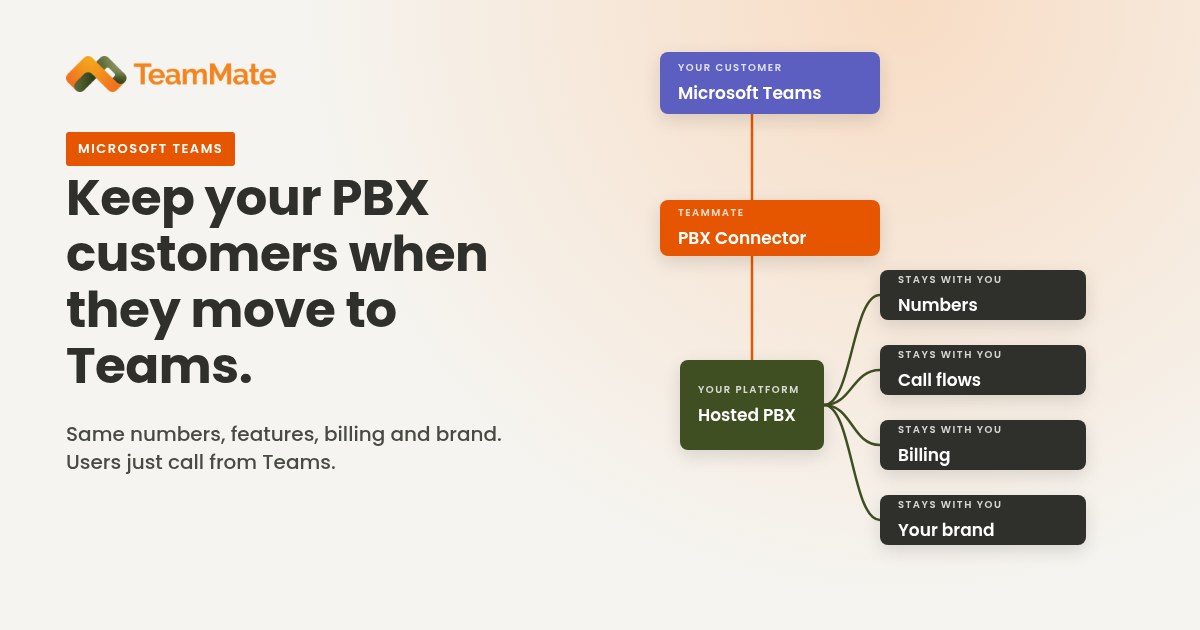
Direct Routing isn't the only way to bring a PBX into Teams. With TeamMate's PBX Connector, each Teams user registers to their own SIP extension on the PBX, so the Teams dial pad becomes a softphone on the phone system you already run. Users keep PBX features such as call park, transfer, queues and voicemail, the phone numbers stay with the PBX, and there's no change to the carrier. The SBC is included, running in 9 Azure regions.
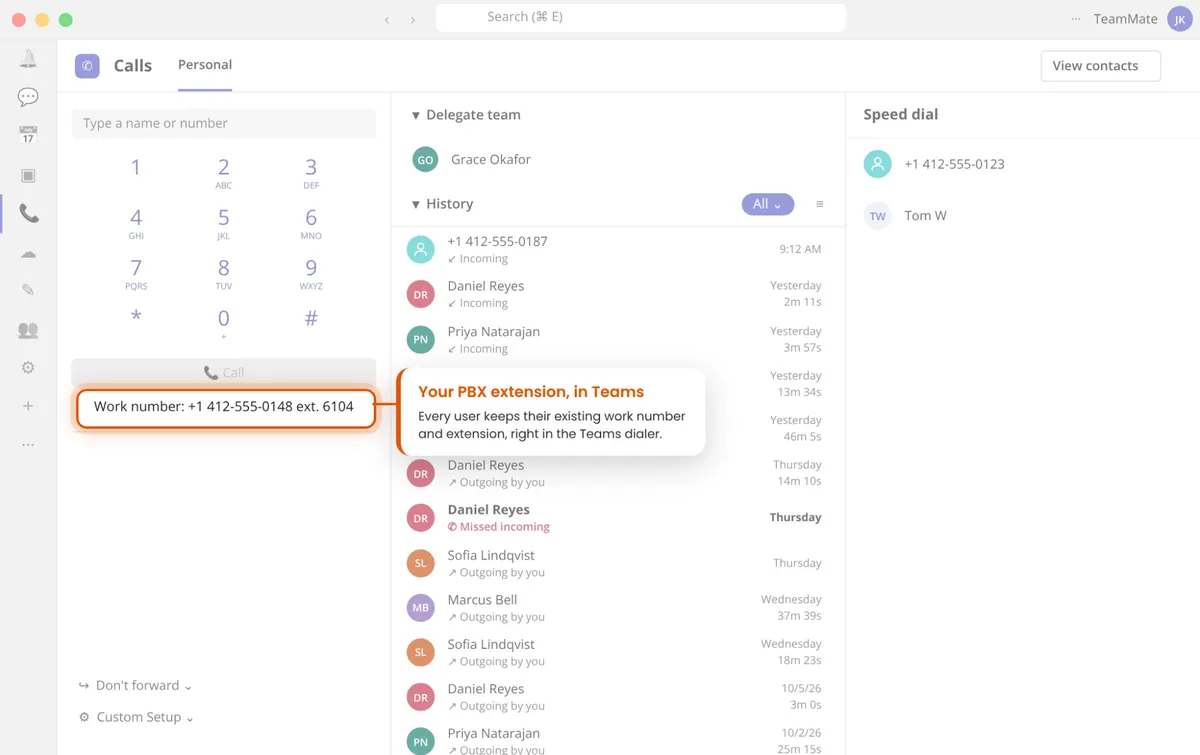
Every user keeps their existing work number and extension, right in the Teams dialer.
For users who don't need Microsoft Phone System licenses, the ACS Call App add-on brings PBX, UCaaS or contact center calling into Teams on Azure Communication Services. For more on the options, read PBX Connector and PBX Connector vs. SIP Trunk Connector.
What to check before a PBX integration
- PBX manufacturer, model and software version
- Existing SIP trunk configuration and carrier agreements
- SBC compatibility and certification requirements
- Dial plans and number normalization
- Call routing between Teams users and PBX extensions
- Voicemail, call transfer and other calling features
- Emergency calling and location requirements
- Failover, redundancy and business continuity
Design the integration around your actual telephony environment rather than assuming every PBX supports the same capabilities.
Connecting SIP trunks to Microsoft Teams
Session Initiation Protocol (SIP) is the signaling protocol used to set up, manage and end voice calls and other communication sessions. Organizations that already use SIP trunks often want to keep their carrier when they adopt Teams Phone.
Direct Routing supports this by connecting Teams Phone to the SIP trunk through a certified SBC, which handles the connection between Microsoft's network and the carrier. TeamMate's SIP Trunk Connector automates that Direct Routing setup and user provisioning, with SBCs included, so the Teams dial pad works on your SIP trunk.
What to check before connecting a SIP trunk
- Whether your carrier supports the intended architecture
- Whether the SBC supports the required SIP signaling and media configuration
- Whether you can keep or port your existing phone numbers
- Whether inbound and outbound call routing meets your business requirements
- Whether the design meets your security and emergency calling requirements
Test the integration with the actual carrier, SBC and Teams configuration before going live.
White-label Teams telephony for service providers
Teams telephony isn't only for organizations deploying Teams internally. Telecom carriers, managed service providers (MSPs) and other communications businesses also want to offer Teams-connected calling to their customers.
A white-label platform lets a service provider deliver its own branded offering in Teams while keeping its existing voice infrastructure.
Why service providers choose white-label integration
A white-label approach helps service providers:
- Extend their existing voice services into Microsoft Teams
- Keep their own brand in front of customers
- Connect the PBX and SIP infrastructure they already run
- Build differentiated communications services
- Manage every customer deployment through one consistent service model
What a Teams PBX integration gives your customers
- Teams as their softphone. Users call from the Teams dial pad on desktop, browser and mobile, while calls keep running on your PBX with features like park, transfer, queues and voicemail.
- A branded app in Teams. A Teams app with your name and logo can put PBX functions one tap away, show voicemail notifications and offer single sign-on into your customer portal.
- One place to work. Calling sits next to chat, meetings and files, so users stop switching between a desk phone, a separate softphone and Teams.
For you, that means a stickier service. Customers who use your calling inside Teams every day are less likely to switch providers, and a branded integration sets you apart from providers that only offer basic connectivity.
How TeamMate fits
TeamMate is a white-label platform that connects service providers' voice and messaging services to Microsoft Teams. It includes:
- PBX Connector: your PBX or UCaaS, native in Teams
- SIP Trunk Connector: automated Direct Routing for your SIP trunk
- Operator Connect Express: Operator Connect provisioning with your own DIDs
- ACS Call App: calling in Teams with no Phone System licenses
- SMS Connector: white-label SMS and MMS in Teams
- Teams Call Recording: recording for Teams calls
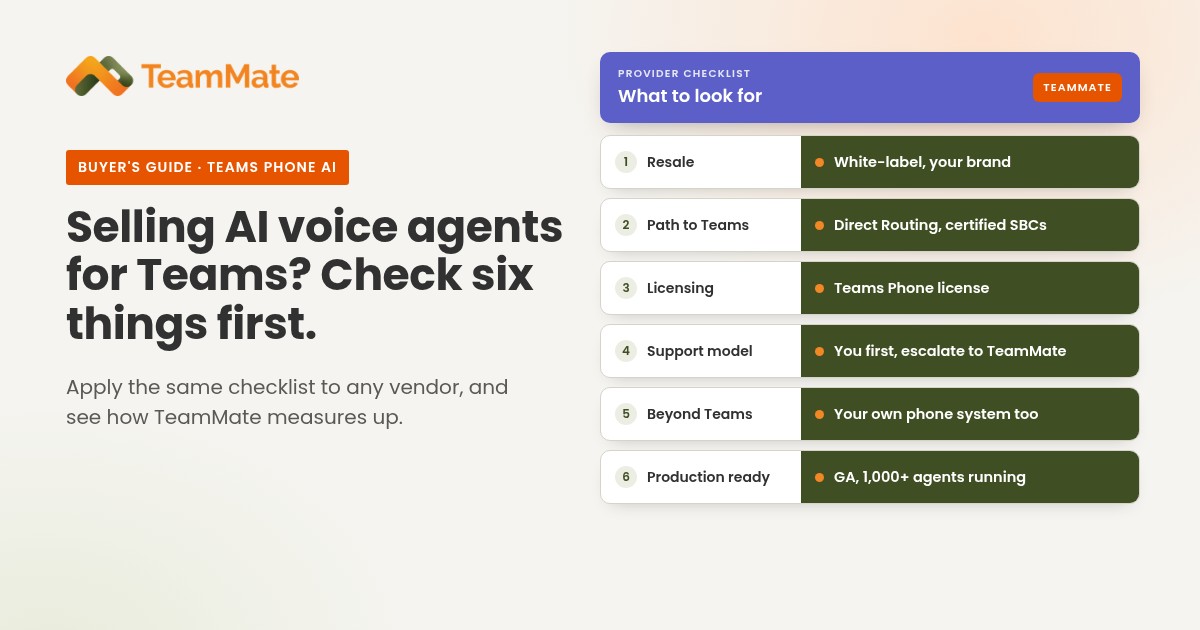
When you evaluate any white-label Teams telephony platform, compare supported integrations, deployment architecture, branding, provisioning, day-to-day management and commercial terms. TeamMate works with partners of every size, and you can try it with a free 30-day proof of concept.
Step-by-step deployment plan
A structured rollout reduces disruption and surfaces technical and operational issues before they affect users.
- Assess your current environment. Document your PBX, carrier, phone numbers, network, user groups and calling requirements. Identify which services must stay up during the transition.
- Choose the connectivity model. Compare Calling Plans, Operator Connect, Direct Routing and Teams Phone Mobile against your infrastructure, carrier relationships, locations and operational needs.
- Confirm licensing and technical requirements. Check Teams Phone licensing, number availability, network readiness, SBC requirements and any other dependencies.
- Configure connectivity and call routing. Set up the PSTN connection, assign numbers, configure routing and test the integrations.
- Run a pilot. Test with a representative group of users, devices, numbers and calling scenarios, and fix issues before expanding.
- Roll out and monitor. Expand in stages, monitor call quality and availability, and put support and incident procedures in place.
Microsoft's Direct Routing planning guidance covers the same ground in more detail: infrastructure and licensing checks, SBC configuration, networking, voice routing, user assignment and verification. For a practical walkthrough, see How to implement Direct Routing.
Licensing and technical requirements
Before you deploy, confirm that your licenses and service agreements cover the calling features you need. Common requirements include:
- Microsoft Teams and Teams Phone licenses
- PSTN connectivity from Microsoft or a participating provider
- Phone numbers, and a plan to assign them
- A certified SBC, or an SBC service, for Direct Routing
- Network readiness and firewall configuration
- Emergency calling configuration
- Voice routing and dial plans
Requirements vary by connectivity model, location, user type and licensing agreement, so check Microsoft's current documentation before finalizing a design. Our post on what you need for Microsoft Teams Direct Routing walks through the licensing.
Security, reliability and emergency calling
Design your telephony integration with security, availability and emergency calling in mind from the start.
Security. Review authentication, access controls, certificate management, network security and the encryption of signaling and media. For Direct Routing, Microsoft sets requirements for supported SBCs, certificates and secure connections. See Teams calling compliance and security for more.
Reliability. Plan for redundant connectivity, SBC resilience, carrier availability, network quality and a documented recovery process. Test failover rather than assuming redundancy guarantees uninterrupted calling.
Emergency calling. Requirements vary by country, connectivity model and architecture. Confirm how emergency calls are routed, how caller location is handled, and who is responsible for configuration, testing and ongoing compliance.
Common challenges and what to check
Even a well-planned deployment can run into problems. Here's where to start:
| Problem | What to investigate |
|---|---|
| Calls fail to connect | Voice routes, number formatting, SBC configuration and carrier connectivity |
| One-way or poor audio | Network paths, firewall rules, media configuration and bandwidth |
| Wrong caller ID | Number assignment, outbound calling policies and carrier settings |
| PBX extensions can't reach Teams users | Dial plans, routing rules and the PBX integration configuration |
| Users can't make external calls | Licensing, number assignment and PSTN connectivity |
| Emergency calls are misrouted | Location configuration, emergency policies and provider responsibilities |
Troubleshoot by following the actual call path, and involve your Teams administrator, carrier and integration provider.
Frequently asked questions
What is Microsoft Teams telephony integration?
It connects Teams to a business phone system or PSTN service, so users can make and receive calls in the Teams app.
Can Microsoft Teams connect to an existing PBX?
Yes. Direct Routing can connect Teams Phone to a supported third-party PBX through a certified SBC, and the exact capabilities depend on the PBX, SBC and design. Another option is PBX Connector, which registers each Teams user as an extension on the PBX.
Can I keep my existing phone numbers?
Usually, yes. Numbers can often be kept through number porting or your carrier arrangement, depending on the provider, the country and the connectivity model. With Direct Routing or a PBX integration, your numbers can stay with your current carrier or PBX.
What is the difference between Direct Routing and Operator Connect?
Direct Routing connects Teams Phone to your telephony infrastructure through a certified SBC, giving you more flexibility over carriers and infrastructure. Operator Connect uses a participating operator that provides PSTN connectivity through Microsoft's Operator Connect program. Read our full comparison of Direct Routing and Operator Connect.
Do I need a Session Border Controller?
A certified SBC is required for Direct Routing. You don't need your own SBC for Calling Plans or Operator Connect, because Microsoft or the operator handles connectivity. TeamMate's connectors include the SBC, so there's no SBC to buy or run.
Can Teams telephony support a hybrid environment?
Yes. You can combine connectivity options in one tenant and connect existing telephony infrastructure where the architecture allows it.
Can service providers offer white-label Teams telephony?
Yes. Service providers can use a white-label platform such as TeamMate to offer branded, Teams-connected voice and messaging services. Capabilities, licensing and commercial terms depend on the platform and service model.
How long does a Teams telephony deployment take?
It depends on the number of users, the existing infrastructure, number porting, carrier coordination, security requirements and integration complexity. A pilot helps you set a realistic schedule.
Choosing the right Teams telephony integration
The right model depends on what you want to achieve:
- For an all-cloud calling service, look at Calling Plans or Operator Connect.
- To keep your existing phone system or carrier, or for more control over connectivity, look at Direct Routing or a PBX integration.
- For a mobile-first workforce, consider Teams Phone Mobile.
- For service providers, the decision also covers how you'll package, deliver, manage and support Teams calling for your customers.
Whichever path you take, start by documenting your current infrastructure, define your calling requirements, compare the supported models, and validate the design with a pilot.
Bring your voice services to Microsoft Teams with TeamMate
If you're a carrier, UCaaS provider or MSP looking to extend your voice and messaging services into Microsoft Teams, TeamMate connects the PBX systems, SIP trunks and messaging services you already run, under your brand.
Book a demo, start a free 30-day proof of concept, or explore the TeamMate platform.